Install Visual Studio Code for Windows

Recently, I was asked my code editor of choice and I default to VS Code unless I need a different editor for application specific customizations. 

First we must download the executable for windows x64

Visual Studio Code overview graphic for installation on Windows.
Screenshot from the Install Visual Studio Code for Windows walkthrough at step 2, showing Open File - Security Warning; the adjacent article text explains that first we must download the executable for windows x64.
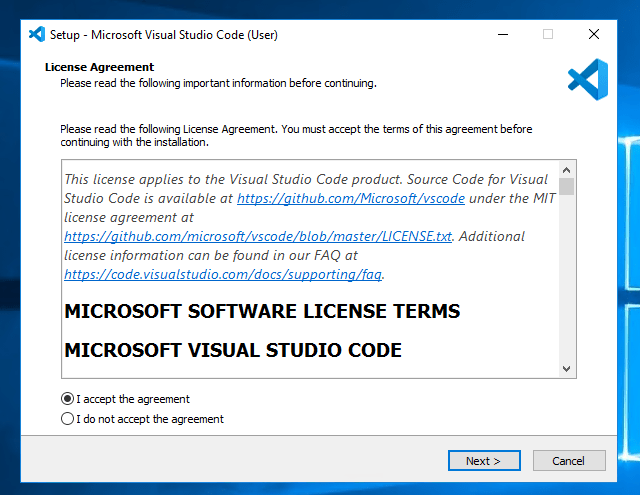
Screenshot from the Install Visual Studio Code for Windows walkthrough at step 3, showing License Agreement; the adjacent article text explains that first we must download the executable for windows x64.
Screenshot from the Install Visual Studio Code for Windows walkthrough at step 4, showing Select Destination Location; the adjacent article text explains that first we must download the executable for windows x64.
Screenshot from the Install Visual Studio Code for Windows walkthrough at step 5, showing Select Start Menu Folder; the adjacent article text explains that first we must download the executable for windows x64.
Screenshot from the Install Visual Studio Code for Windows walkthrough at step 6, showing Select Additional Tasks; the adjacent article text explains that first we must download the executable for windows x64.
Screenshot from the Install Visual Studio Code for Windows walkthrough at step 7, showing Ready to Install; the adjacent article text explains that first we must download the executable for windows x64.
Screenshot from the Install Visual Studio Code for Windows walkthrough at step 8, showing Welcome - Visual Studio Code; the adjacent article text explains that first we must download the executable for windows x64.

Summary:
As you can see it is very quick to download and install Visual Studio Code.  Configuring and adding add on’s is where the real fun begins.  As always, I hope ya’ll found this article useful.

Continue reading

Make Visual Studio Code Default Editor in Git Post Install

Explore another guide in this topic and build on what you have just read. Read the article

Leave a Comment

Discover more from Digital Thought Disruption

Subscribe now to keep reading and get access to the full archive.

Continue reading