NSX-T Tier-1 Gateways page where the NAT-enabled gateway will be created.

Deploying NAT Services on NSX-T

There may be instances when you want to leverage NSX-T for NAT services and not an external NAT services. Thanks to the simplified management of NSX-T deploying these services is easy. Terms:Source NAT (SNAT): translates a source IP address of outbound packets so that packets appears as originating from a different network Destination NAT (DNAT): … Explore: Deploying NAT Services on NSX-T

NSX-T capabilities matrix covering overlays, routing, firewalling, automation, DHCP, telemetry, OpenStack integration, and ecosystem support.

Four Benefits of NSX-T Not Named Micro-Segmentation

Over the past couple years I hear the term Micro-Segmentation over and over and over and over again as the benefit of NSX & software defined networking.  I thought I would take a moment to write about four benefits of NSX-T I’m witnessing in my environments that bring value add on top of Micro-Segmentation. 1. … Explore: Four Benefits of NSX-T Not Named Micro-Segmentation

Digital Thought Disruption

NSX-T 2.4 Release & What’s New

I wanted to take a moment and provide a link to the new feature release of NSX-T 2.4. This has been a major release with a re-architecture of the NSX-T components. Some feature highlightsCombining the NSX Manager and Controller nodes into a single applianceInfrastructure as CodeExpanding Security FeaturesHigher Levels of Scale, Resiliency, Performance https://blogs.vmware.com/networkvirtualization/2019/02/introducing-nsx-t-2-4-a-landmark-release-in-the-history-of-nsx.html/

Diagram showing a vSphere distributed port group spanning two hosts and connecting virtual and physical network adapters.

Create a vSphere Distributed Switch and Port Groups

Quick answer: distributed switch versus port group A vSphere Distributed Switch (vDS) is the datacenter-level switch configuration that vCenter Server applies consistently across multiple ESXi hosts. A distributed port group is a policy-defined set of ports on that switch for a specific network or traffic type. Create the vDS first, create and validate its port … Explore: Create a vSphere Distributed Switch and Port Groups

Diagram showing four development virtual machines and their IP addresses connected to one Dev logical switch or segment.

Connecting a Virtual Machine to a NSX-T Logical Switch/Segment

Prerequisites The VMs must be hosted on hypervisors that have been added to the NSX-T Data Center fabric. The fabric nodes must have NSX-T Data Center management plane (MPA) and NSX-T Data Center control plane (LCP) connectivity. The fabric nodes must be added to a transport zone. A logical switch must be created. Steps: In … Explore: Connecting a Virtual Machine to a NSX-T Logical…

NSX-T diagram showing north-south traffic through physical routing, Tier-0 and Tier-1 service and distributed routers, and a logical switch.

NSX-T Routing 101

When I first tackled NSX-T, like many, I was concerned about IO/Packet flow. Based on feeding my own curiosity while preparing my production environment for NSX-T I decided to write this article. Below you will find high level overview of components and the two tier routing topology. Routing can be defined in the following directions: … Explore: NSX-T Routing 101

Digital Thought Disruption

NSX-T Component Overview

NSX-T Manager Controller provides the graphical user interface (GUI) and the RESTful API for creating, configuring, and monitoring NSX-T components, such as logical switches. NSX-T Manager Controller implements the management plane for the NSX-T infrastructure. It provides an aggregated system view and is the centralized network management component of NSX-T. It provides a method for … Explore: NSX-T Component Overview

Site Recovery navigation showing Recovery Plans alongside replications and protection groups.

Part 4. DRaaS – The four click failover to VMware Cloud on AWS and back

This is my fourth and final installment of this series. These steps were taken by me to failover and failback multi-million dollar datacenters in as easy as 4-clicks. At this point we should have our SDDC deployed and linked back to our onprem. VR/SRM should be deployed both onprem and in the SDDC. All site … Explore: Part 4. DRaaS – The four click failover…

vSphere vSAN disk-group performance view used to monitor write-buffer use and destaging behavior.

Performance Tuning your vSAN / VxRail Environment

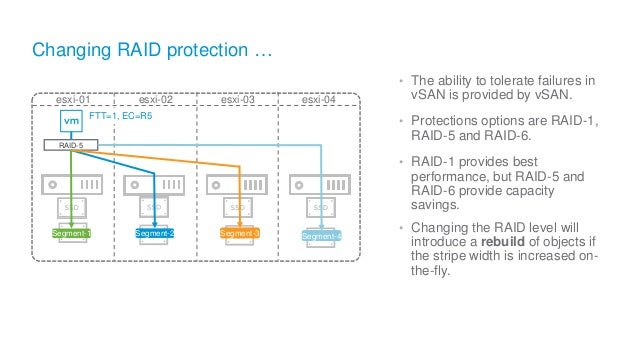
Recently, I have been getting a lot of questions around how to build vSAN for high performing workloads. This article is intended to cover hardware differences, slack space, what is vSAN namespace, object, component, Raid-1 vs Raid-5/6, and stripe width, which all can impact performance. Please keep in mind I am not covering dedup/compression overhead … Explore: Performance Tuning your vSAN / VxRail Environment

VMware vSphere Appliance Management login screen used to access the external Platform Services Controller.

Upgrade vCenter with external PSC to 6.5 U2b

In my previous article I showed everyone how to install the latest vCenter 6.5 U2d. Now I will show how to upgrade your existing vCenter to 6.5 U2b and why created new vCenter’s with embedded Platform Services Controllers will make upgrades even easier. Before we begin, always remember to take a snapshot before upgrading any … Explore: Upgrade vCenter with external PSC to 6.5 U2b

Windows File Explorer showing the downloaded vCenter Server Appliance ISO selected for mounting.

How to Install a vCenter (VCSA) 6.5 U2d

As we are all aware vCenter is at the heart of our vSphere environments. Whether deploying a lab or a net new datacenter with vSAN/VxRail, you will require a new vCenter. Before I begin, embedded vs external Platform Services Controller (PSC). I say treat any net new install as embedded PSC only. VMware is in … Explore: How to Install a vCenter (VCSA) 6.5 U2d

Site Recovery navigation with Protection Groups selected and the New control available.

Part 3. DRaaS on VMWare Cloud on AWS – Config Replication/Protection Groups/Recovery Plans

This is the third installment of my ongoing series on DRaaS. We have have by now installed VR/Site Recovery Manager, configured site pairings, and configured onprem and SDDC mappings. Now it is time to setup Replication, Protection Groups and Recovery Plans. What are Protection Groups and Recovery Plans A protection group is a group of … Explore: Part 3. DRaaS on VMWare Cloud on AWS…

VMware Cloud console control for creating an SDDC with a stretched cluster.

VMware Cloud on AWS HA with Stretched Clusters

Each AWS Region supports the infrastructure and services for a given geography. Within each Region, Amazon builds isolated and redundant islands of infrastructure called Availability Zones (AZ). With VMware Cloud on AWS, ESXi hosts traditionally reside in an AWS Availability Zone (AZ) and are protected by vSphere HA. In the event of losing a ESXi … Explore: VMware Cloud on AWS HA with Stretched Clusters